%20(4)-1.png?width=1950&height=299&name=Cybaverse%202024%20White%20new%20(2)%20(4)-1.png)
Navigate to Settings
Enter User Details
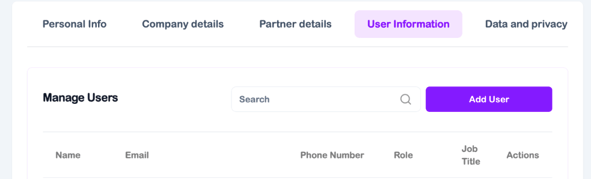
- From the main dashboard, click on Settings
- Then select User Information
Add a New User
- Click the Add User button
- A pop-up window or dialogue box will appear
Enter User Details
- Fill in the required information for the new user
- You will also need to set an initial password for them
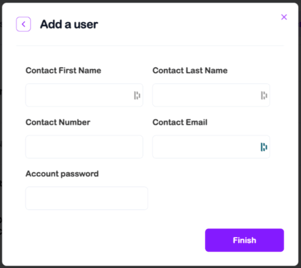
The password you set here is temporary. It’s highly recommended to share it in person or via a voice call to ensure it remains secure and cannot be intercepted.
- User Login & Password Change
- Once the user logs in for the first time, they should be prompted (or encouraged) to change their password to something only they know.