%20(4)-1.png?width=1950&height=299&name=Cybaverse%202024%20White%20new%20(2)%20(4)-1.png)
For a device to be compliant, it’s operating system must be receiving current security updates from the vendor/manufacturer.
Below are links to the most common device OSs current support status:
Windows Desktop
Windows Server
MacOS
Linux Ubuntu
Linux RedHat
Linux Debian
iOS
Android
For other Operating Systems, please check the end of life site or reach out to the manufacturer/ vendor.
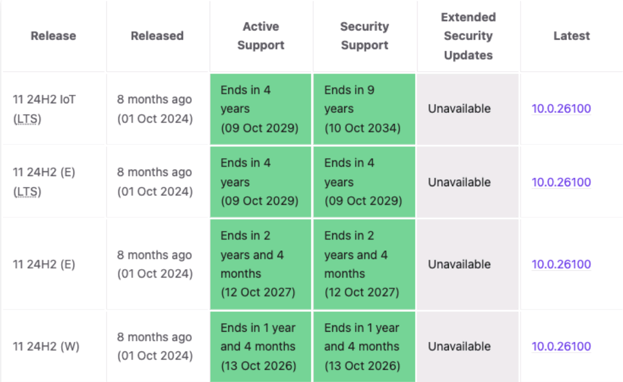
Some device OSs may use LTS, LTSC or ESU, to extend their compliance.
LTS (Long-Term Support)
LTS refers to Long-Term Support and is a general term (used by many vendors, including Microsoft and Ubuntu) for software versions that receive extended support and updates—especially security patches—over a longer period than regular releases.
- Purpose: Ideal for systems where stability and reliability are critical
- Support Duration: Typically 5 years or more
- Who it’s for: Businesses and environments where frequent updates are disruptive (e.g. servers, medical systems, industrial machines)
LTSC (Long-Term Servicing Channel)
LTSC is Microsoft’s specific version of LTS, most commonly applied to Windows 10/11 Enterprise and Windows Server.
- Key Features:
- No feature updates—only security and critical fixes
- Released approximately every 2–3 years
- 10 years of support (5 years mainstream + 5 years extended)
- Typical Use Cases:
- Medical devices
- ATMs or kiosks
- Industrial control systems
LTSC versions are very stable but do not include new features introduced in standard versions (like Cortana, Edge updates, Windows Store, etc.).
Extended Security Updates (ESU)
Extended Security Updates (ESU) are a paid service from Microsoft that provides critical security updates beyond the normal end-of-support date for older software.
- When it’s used: After a product (like Windows Server 2012 or Windows 7) reaches end of support
- What it covers: Only security fixes—no feature updates, no new support
- How it’s delivered: Via volume licensing agreements or Microsoft partners
- Typical Duration: Up to 3 years post end-of-support, renewable annually
ESU is often used by organisations that need more time to transition to supported platforms.