%20(4)-1.png?width=1950&height=299&name=Cybaverse%202024%20White%20new%20(2)%20(4)-1.png)
All calls are booked directly through the platform in the CE+ module, using our simple online calendar. There are two main types of calls you'll need to schedule: the Pre-Audit Call and the Audit Call.

Step 1: Book Your Pre-Audit Call
Before you can schedule your Pre-Audit Call, there are two things you'll need to complete:
- Install the Qualys Agent: This tool helps identify vulnerabilities and must be installed on all in-scope Devices.
- Upload Your External IP Address(es): These allow external scans of your network.
Once these steps are done, the option to book your Pre-Audit Call will appear in the platform.
The Pre-Audit Call is a great opportunity to review scan results and make sure you're on the right track before the full assessment.
Step 2: Book Your Audit Call
You'll be able to book your Audit Call after the Pre-Audit Call has taken place.
Before booking, we strongly recommend reviewing and fixing all vulnerabilities listed in your CE+ module. Addressing these early gives you the best chance of passing the audit without delays.
Need a Sooner Slot?
Both calls are booked through our online calendar, which shows available appointment times in real-time.
If you're working to a tight deadline or can't find a convenient time:
If you are having a fast-track CE+, you can request a sooner time slot through the booking screen. 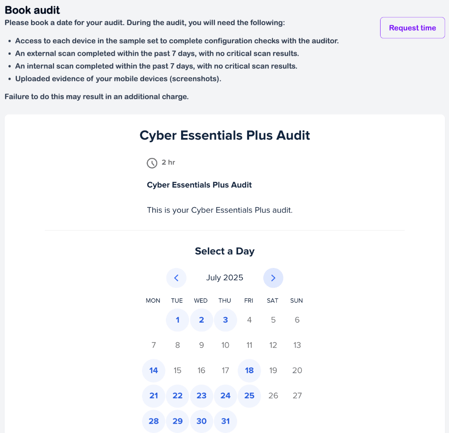
Or email your account manager directly
We'll do our best to find a time that works for you.